
Project API keys
A project API key lets an agent over MCP, or your own code over REST, call search and fetch for one project. It carries only those two permissions and never your sign-in rights. Keys look like fs_live_ followed by a 12-character prefix and a secret.
You need permission to manage API keys in the project, which project admins have by default. The key page is API keys in the project sidebar.
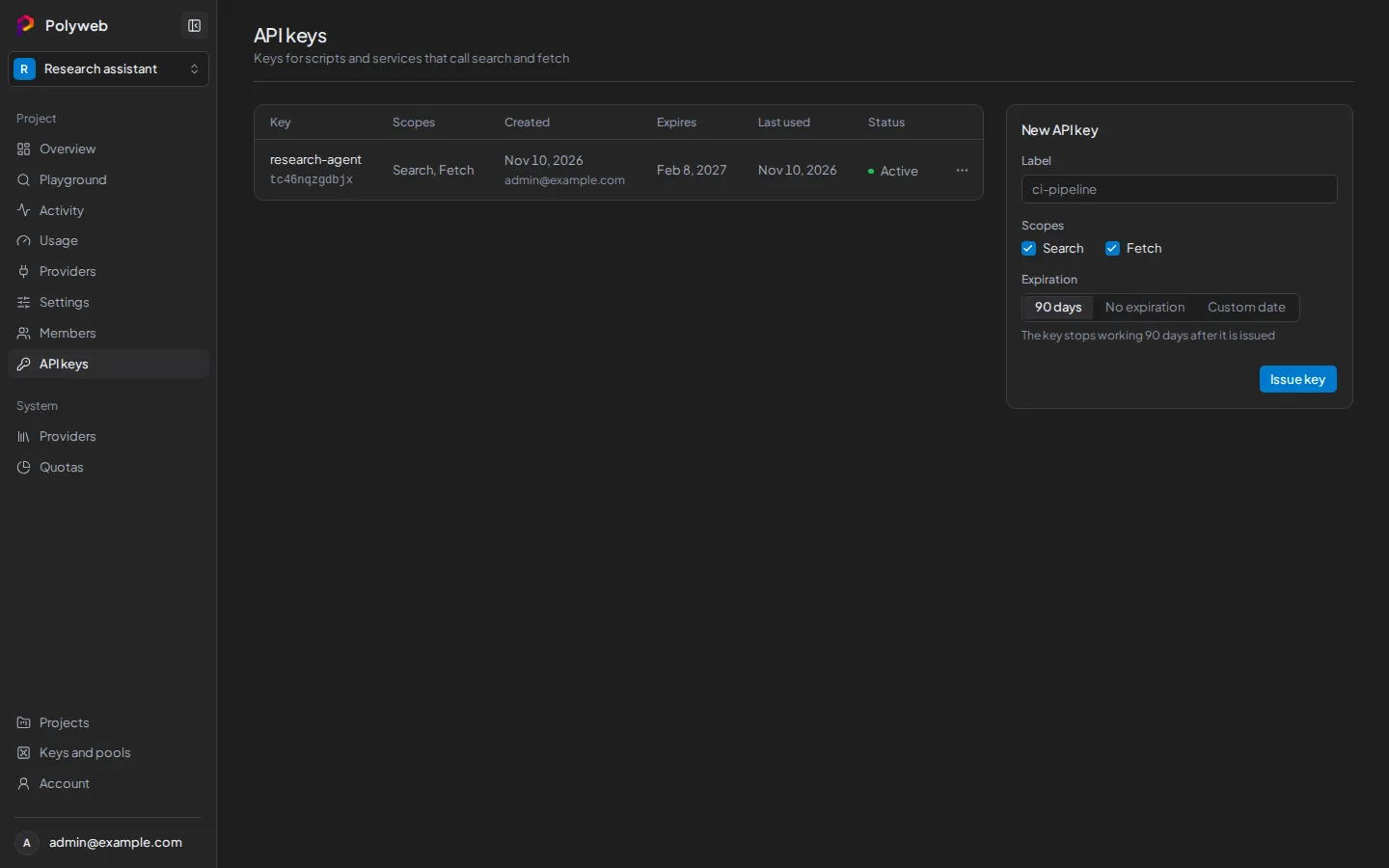
Create a project API key
Section titled “Create a project API key”- Open the project and press API keys.
- In the New API key form, enter a Label such as
ci-pipeline. - Under Scopes, tick Search, Fetch, or both. These map to
search.executeandfetch.execute. A scope you don’t hold yourself is disabled. - Choose an Expiration: 90 days (the default), No expiration, or Custom date. A custom date is
YYYY-MM-DD, and the key stops working at the end of that day. - Press Issue key.
- In the Copy your new API key dialog, press Copy key and store it in a secret manager.
- Press Done.
Polyweb shows the key only once. If you lose it, rotate the key to get a new one.
Use the key
Section titled “Use the key”Send the key as a Bearer token in the Authorization header, and never in a URL. Replace fs_live_REPLACE_ME with your key.
curl -X POST http://localhost:8001/search \ -H "Authorization: Bearer fs_live_REPLACE_ME" \ -H "Content-Type: application/json" \ -d '{"query": "solar panel prices", "limit": 5}'For an agent, store the key in POLYWEB_API_KEY and follow Connect an agent. For REST details, see REST API overview.
A key can only act for its own project. A key with only the Search scope gets a 403 from fetch, and the other way round.
Read the key list
Section titled “Read the key list”The table shows each key’s label and prefix, its Scopes, Created, Expires, Last used, and Status: active, expired, or revoked. Use the prefix to tell keys apart. The secret is never shown here.
Rotate a key
Section titled “Rotate a key”Rotation issues a replacement and lets the old key keep working for a while, so you can update your agent without downtime.
- Open the row menu of an active key and press Rotate key.
- Set Old key stays valid for: Revoke old key now, 1 hour, 24 hours (the default), or 7 days.
- Set Expiration for the new key. Keep current gives it the old key’s expiry date.
- Press Rotate key, then copy the new key from the dialog.
You can’t rotate a key that is revoked, expired, or already rotated.
Revoke a key
Section titled “Revoke a key”Open the row menu and press Revoke key, then confirm. Programs that use the key stop working at once, and you can’t undo it. Only active keys have a menu.
Permissions and limits
Section titled “Permissions and limits”| Situation | What happens |
|---|---|
| You can’t manage API keys | The API keys link is hidden. Ask a project admin. |
| The project is archived | You can revoke keys, but not issue or rotate them. |
| A key is unknown, expired, or revoked | REST returns 401. |
| A key lacks the scope for the call | REST returns 403. |
See Authentication and keys for how project API keys differ from sign-in sessions.
Next steps
Section titled “Next steps”- Connect an agent to the MCP server with your new key.
- Playground lets you try a call without a key.